Below are two graphs plotting the number of images on a page against the total KB transferred by Chrome 13 for both a page with JSIO and without JSIO (which I, for some reason have called a “plain” page).
I build websites for a living, so I have a lot of folders of images from various websites lying around which form the two data sets for the graphs. I’d like to think of them as a typical set of website images, but you may argue that they are typical for the websites that I build.
I knocked up a script that when given a folder of images, will output a “plain” HTML page, a JSIO HTML page and a JSIO resources file with the following numbers of images on them: 2, 4, 6, 8, 10, 20, 30, 40, 50, 60, 70, 80, 90, 100, 200, 300, 400, 500, 600, 700, 800, 900, 1000 and 1100. Before generating any of the pages, the order of the images were randomised to better represent a web page’s inclusion of different images for different purposes.
Chrome 13 was used with the developer toolbar to determine how many requests were being made and the actual KB transferred (with slight rounding errors) by the browser. In my opinion I would say that Apache was set up to serve image and javascript content typical of many servers on the internet in that images were not gzipped but javascript files were; the register, bbc, for example.
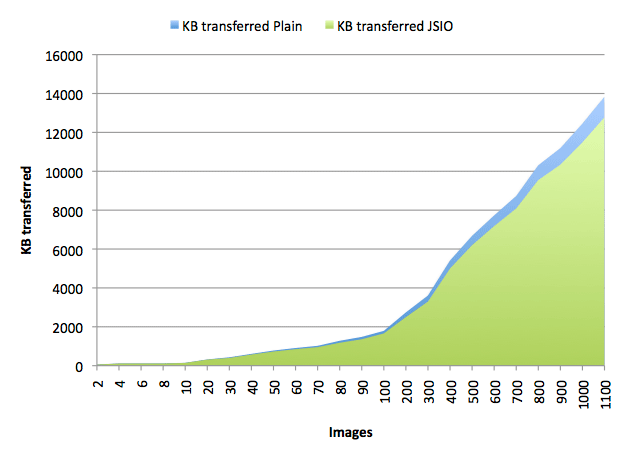
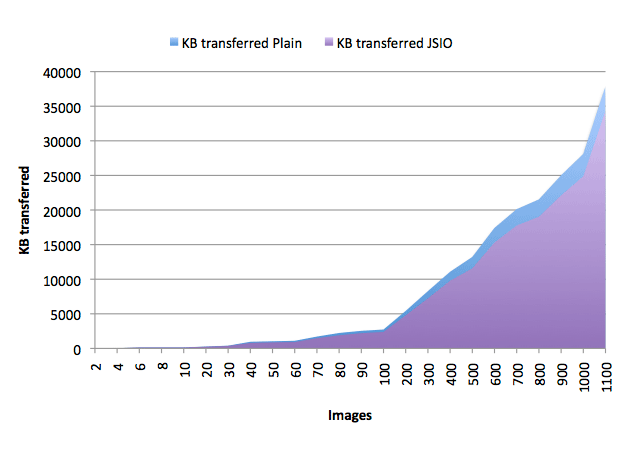
What is interesting to note is that the number of bytes transferred by JSIO are consistently lower than the bytes transferred by a plain HTML page…but not by a lot. The file size inflation due to base64 encoding seems to cancel out a lot of bytes the gained from making fewer requests. However, it is obvious that JSIO won’t actually lose you any bytes, but it isn’t going to save you a substantial amount. That said, saving bytes isn’t the only benefit of JSIO, remember that one of JSIO’s goals is also to alleviate some of the problems surrounding the creation and use of image sprites – which it does also do very well.
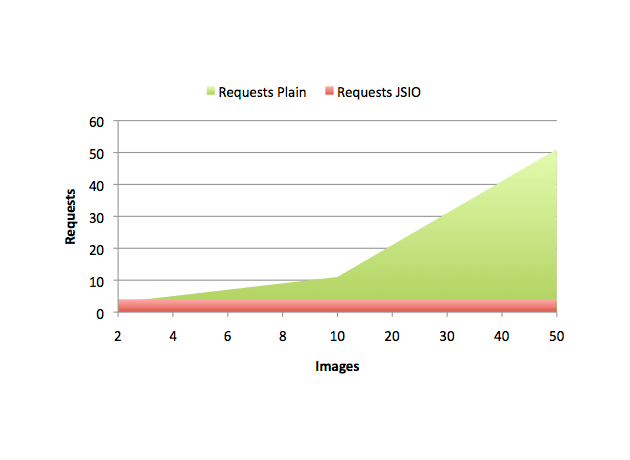
The graph below is just for fun, it plots the number of requests made by JSIO pages against the number of requests made by plain HTML pages. Note the JSIO pages make a constant 4 requests (index.html, jsio.js, jsio-resources.js and jsio.gif) independent of how many images are on the page:
References:
Napoleons casino hull
References:
https://musiciansportal.ru/starlabryson77