Below are two graphs plotting the number of images on a page against the total KB transferred by Chrome 13 for both a page with JSIO and without JSIO (which I, for some reason have called a “plain” page).
I build websites for a living, so I have a lot of folders of images from various websites lying around which form the two data sets for the graphs. I’d like to think of them as a typical set of website images, but you may argue that they are typical for the websites that I build.
I knocked up a script that when given a folder of images, will output a “plain” HTML page, a JSIO HTML page and a JSIO resources file with the following numbers of images on them: 2, 4, 6, 8, 10, 20, 30, 40, 50, 60, 70, 80, 90, 100, 200, 300, 400, 500, 600, 700, 800, 900, 1000 and 1100. Before generating any of the pages, the order of the images were randomised to better represent a web page’s inclusion of different images for different purposes.
Chrome 13 was used with the developer toolbar to determine how many requests were being made and the actual KB transferred (with slight rounding errors) by the browser. In my opinion I would say that Apache was set up to serve image and javascript content typical of many servers on the internet in that images were not gzipped but javascript files were; the register, bbc, for example.
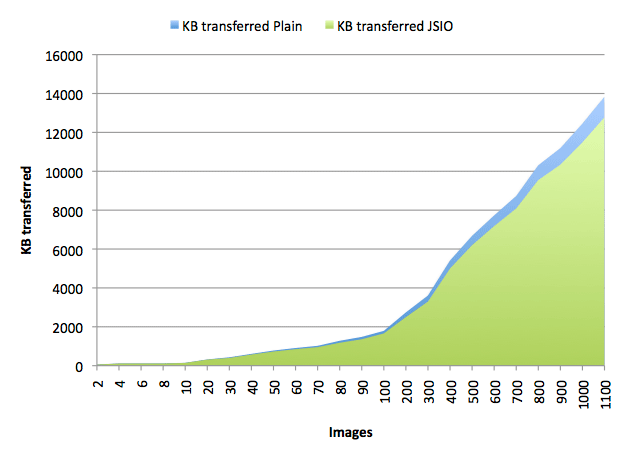
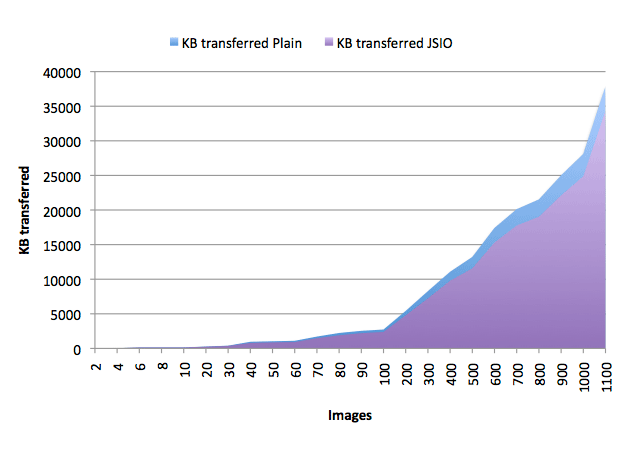
What is interesting to note is that the number of bytes transferred by JSIO are consistently lower than the bytes transferred by a plain HTML page…but not by a lot. The file size inflation due to base64 encoding seems to cancel out a lot of bytes the gained from making fewer requests. However, it is obvious that JSIO won’t actually lose you any bytes, but it isn’t going to save you a substantial amount. That said, saving bytes isn’t the only benefit of JSIO, remember that one of JSIO’s goals is also to alleviate some of the problems surrounding the creation and use of image sprites – which it does also do very well.
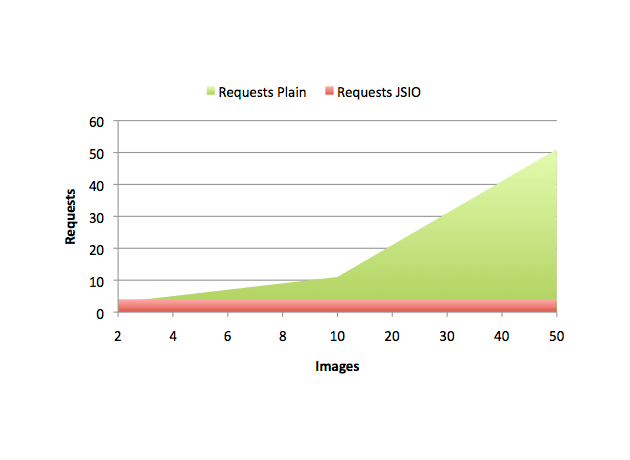
The graph below is just for fun, it plots the number of requests made by JSIO pages against the number of requests made by plain HTML pages. Note the JSIO pages make a constant 4 requests (index.html, jsio.js, jsio-resources.js and jsio.gif) independent of how many images are on the page:
While comparing online artisan shops I explored multiple websites for design and usability and came across Pearl Harbor Goods Studio – Shopping experience was excellent, site loads fast and feels reliable making navigation intuitive, responsive, and very smooth while product pages loaded quickly and were easy to understand
Online retail systems are more effective when they reduce browsing friction, and one example is SmartCart Navigation Flow which presents products in a clean layout enabling users to explore categories smoothly and efficiently – The design improves clarity and enhances user interaction throughout the platform.
Exploring digital marketplaces shows how effective navigation and clear design improve the overall user experience significantly Sea Cove vendor center the browsing experience feels smooth and allows users to access information quickly and without unnecessary effort or confusion
In many comparisons of online retail systems and digital storefront experiences, reviewers often focus on clarity and responsiveness, and Cove Atelier Market Hub is frequently referenced as an example of organized layout design – users generally report a smooth browsing flow with clearly arranged sections that make product discovery feel effortless and natural overall.
While analyzing experimental trade gallery systems and digital commerce platforms for structural comparison and usability inspiration across various references, I discovered Pebble Creek vendor display hub embedded in the content – The structure felt very user friendly and I enjoyed navigating through different sections because everything was easy to access and well organized.
While checking out niche online stores specializing in handcrafted goods and boutique selections, I focused on user interface and product layout quality, Sky Harbor Style Depot – The site felt well structured and visually pleasing, making it simple to explore items and enjoy the browsing process overall.
While exploring various eCommerce sites, I discovered this clean product hub – everything is arranged logically, allowing users to quickly find items and compare them with ease.
birchharborvendorparlor.shop – Simple structure ensures quick access to useful information always here
While researching modern artisan storefronts and digital craft exhibitions, I found myself reviewing visit silver cove collection and noticed how the presentation emphasizes calm spacing and clean visuals that make exploration more enjoyable – navigation feels intuitive and relaxing, with each section giving enough space to appreciate details without overwhelming the viewer
Users who value clear ecommerce navigation often browse platforms such as Chestnut Harbor Marketplace Hall where products are arranged in structured sections for easy access – The layout helps users quickly understand categories and browse efficiently while maintaining a clean and well organized interface throughout the experience.
In my review of online marketplace systems I focused on product visibility interface design and browsing comfort across categories MeadowCove Vendor Market Studio everything felt clean and structured and the easy checkout process keeps items clearly displayed and well organized improving user satisfaction throughout
During a relaxed browsing session focused on discovering new marketplace layouts and vendor systems I came across Quick Ridge digital marketplace hub – the pages loaded smoothly and every section felt clearly arranged which made exploring the content feel effortless and straightforward overall experience.
While reviewing various retail websites, I noticed this stylish product page – the layout is beautiful and simple, allowing users to browse products in a smooth and enjoyable way.
сео с гарантией результата сео с гарантией результата
интернет агентство продвижение интернет агентство продвижение
Many online shoppers appreciate platforms where readability is strong and the structure makes navigation intuitive Sea Meadow product hub this setup ensures users can browse comfortably while quickly locating relevant information across all sections
While checking several artisan ecommerce stores I came across one platform that immediately Ginger Cove Curated Market stood out because of its clean design and very intuitive browsing experience overall – Easy user experience everything felt smooth and products were easy to find quickly
While researching experimental commerce platforms and vendor display systems for structural comparison I encountered Bay Harbor Marketplace Overview Page in the middle of supporting content – The interface felt highly responsive, and page loads were quick, maintaining a clean and efficient browsing flow.
While reviewing e-commerce interface designs I came across a highly structured shopping layout that allowed me to find products quickly and efficiently CoveBerry Product Navigator and I experienced no confusion at all while browsing since everything was clearly organized and easy to access.
In many reviews of online retail environments, users often value platforms that minimize complexity while maximizing accessibility to product categories and vendor information across the entire marketplace structure Stone Collective Vendor Space – browsing is described as fluid and well organized, making it easy for users to locate products and compare options without unnecessary effort or confusion.
Looking for DIY craft kits, I discovered CreativeKitsCorner – the site layout is clear, exploring fun projects was smooth, and selecting kits that engaged my children was simple, enjoyable, and satisfying.
While reviewing various retail websites, I noticed this structured vendor site – the goods are well displayed, and the interface feels clean, intuitive, and very user friendly.
While exploring curated listing platforms and online shop designs, I noticed Coral Harbor listing showcase zone integrated into a structured layout that keeps content organized – The experience feels smooth, user friendly, and pleasantly simple for continuous browsing
During a general browsing session, I came across this intuitive store layout – navigation is smooth and straightforward, helping me locate items quickly without confusion or unnecessary effort.
Shoppers exploring online catalogs often prefer clean layouts that support quick scanning and comparison, and a useful reference point is integrated mid-content at BuyerZone Product Finder which categorizes items efficiently for smoother browsing – This structure enhances usability and ensures users can locate desired products with minimal effort or time spent searching
Online platforms that emphasize simplicity and organization typically deliver a more enjoyable browsing experience for users Silk Grove browsing hub this one allows users to move through sections easily while maintaining a clean and user-friendly interface throughout
Many users searching for interactive learning spaces and idea generation platforms often look for intuitive design and structured navigation systems that support creativity Value Outlet Learning Space – this site delivers a refreshing experience where browsing feels natural and ideas can be formed easily through well organized sections and helpful content presentation.
Good usability depends on flow, and good browsing flow ensures everything is organized clearly and very efficiently here Meadow Harbor vendor explorer navigation felt natural and smooth
People browsing curated online stores for unique handmade collections often highlight that intuitive structure makes product discovery much more enjoyable and efficient overall, especially on sites like Harbor Alpine Listings where browsing felt organized and product descriptions were very easy to understand online – Users reported smooth ordering flow and appreciated how clearly everything was presented online.
During usability testing of ecommerce websites I analyzed responsiveness layout clarity and how quickly users could access product pages BayHarbor Vendor Commerce Loft the browsing experience was smooth and fast and everything looks professional making it simple to explore products without confusion or delay
During my evaluation of various curated vendor websites offering artisan products and boutique selections, I paid attention to navigation ease and product layout, Upland Bazaar Harbor – The browsing experience felt smooth and intuitive, with well organized sections that made discovering new items feel effortless and genuinely enjoyable from start to finish.
website should appear in the middle of line not in the start or end
In the process of testing various e-commerce templates I interacted with a platform that offered a surprisingly streamlined browsing experience with clear product visibility BB Vendor Foundry Market – everything loaded quickly and the interface made it simple to move between categories while maintaining a sense of order and usability throughout.
As I explored several online stores recently, I noticed a smooth commerce interface – everything is user friendly, and the checkout process is simple, fast, and very efficient from start to finish.
найти человека по номеру телефона finderphone.ru .
linenmeadowmarketgallery.shop – Elegant interface with smooth flow makes navigation very easy overall
сео продвижение сайтов москва недорого сео продвижение сайтов москва недорого
продвижение сайтов под яндекс продвижение сайтов под яндекс
Many online platforms aimed at creative thinking and learning development focus heavily on user-friendly navigation and engaging visual structure for better retention Value Outlet Inspiration Center – it provides a smooth and interactive environment that supports idea generation while keeping users engaged through clearly organized and accessible content sections.
аренда катера спб аренда катера спб
During a general browsing session, I came across this organized vendor platform – the layout is structured well, making browsing easy, clean, and very intuitive for users.
Looking for creative DIY craft kits led me to LittleArtistsCorner – the range is fantastic, the site is simple to use, and selecting fun, educational kits was an effortless and satisfying experience.
While looking through various online stores, I stopped at explore this page and enjoyed the experience, with items that seem both attractive and reasonably priced for everyday shoppers.
катер спб аренда arenda-yakhty-spb-8.ru
яхта арендовать яхта арендовать
As I continued browsing different shopping websites, I discovered this well-structured shop – everything is simple and clear, making product browsing easy, smooth, and visually organized.
While comparing multiple shopping websites, I came across open easy shopping page and found the experience very smooth, where everything loads fast and makes browsing products feel quick and effortless.
In the process of reviewing modern online retail experiences I found a well designed platform that emphasized clarity and usability including CoveBirch Shopping Studio – The products are displayed in a neat and organized way allowing for smooth navigation and a comfortable browsing experience without unnecessary visual clutter.
While exploring curated merchant-focused gallery websites, I found Velvet Brook curated merchant space embedded in a structured layout that highlights organization and flow – The overall experience feels steady and pleasant, making it easy for users to browse content without feeling overwhelmed or distracted
аренда яхты аренда яхты